
The Dispatch Center
The Dispatch Center is the dispatcher's home page. It's where unscheduled work meets your drivers: a calendar timeline of every driver's day, with the load queue alongside it.
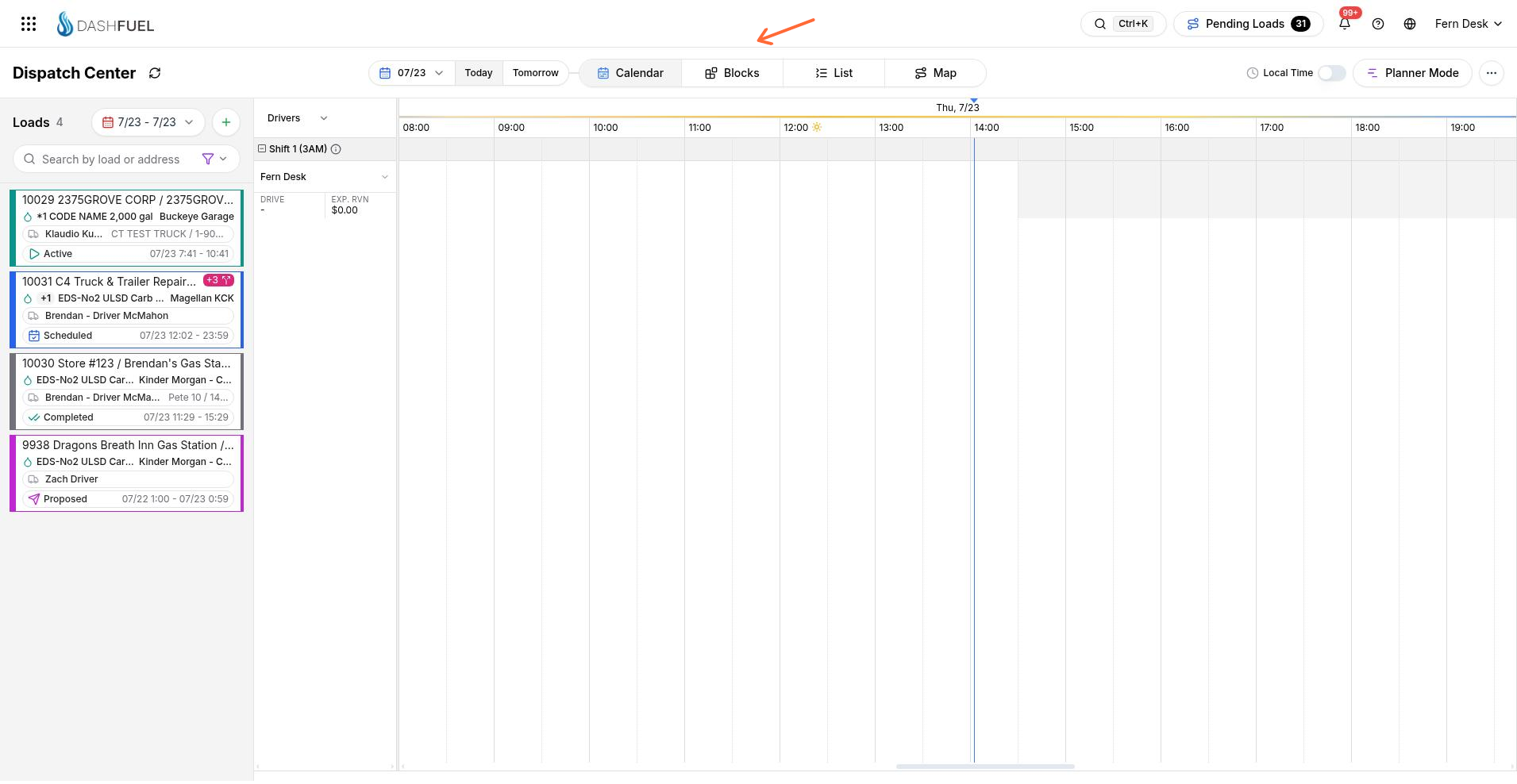
The calendar view
Each row is a driver (with their truck and trailer), each block is a load. The left panel lists loads for the selected date range — searchable and filterable — with each card showing the customer and site, products and gallons, terminal, status, and delivery window.
Scheduling is drag-and-drop:
Drag a load from the queue onto a driver's row to schedule it for that driver at that time.
Drag a scheduled load to a different time or driver row to reschedule or reassign it.
Resize a block to change its start and end times.
The + button in the loads panel creates a new load, and Today / Tomorrow and the date picker move the board through the schedule. Planner Mode switches to the planning layout.
List and Map views
List shows the same loads as a table — handy for working through unscheduled loads in bulk.
Map shows your drivers' locations; from a driver's panel you can create a load pre-assigned to them.
Proposing loads to drivers and carriers
Instead of scheduling directly, you can propose a load to a driver or common carrier. They're notified and can accept (the load becomes Scheduled) or reject it with a reason (the load becomes Rejected and dispatch is notified). Resolving a rejected load returns it to Scheduled.
Drivers are notified automatically when loads are scheduled to them, taken from them, or changed — including when a load is moved between drivers.
Statuses on the board
Load cards and calendar blocks are color-coded by status (Unscheduled, Scheduled, Active, Loaded, Completed, Problem…), so a glance at the board shows what's moving, what's done, and what needs attention. See the Loads overview for the full status list.